Advanced Pure Pursuit: From Theory to Tuning
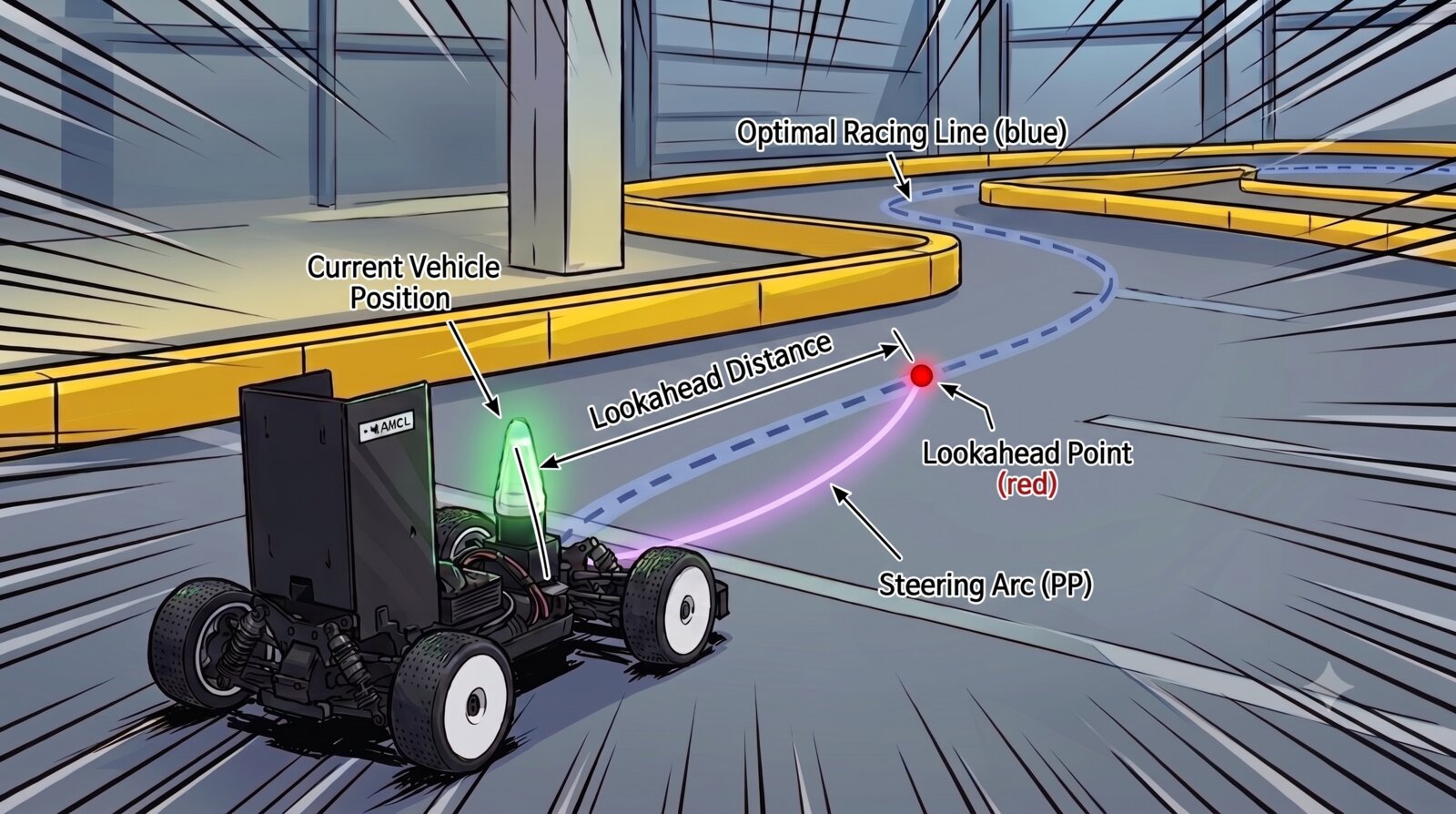
1. Pure Pursuit — The Principle of Path-Following Control
Controller
The runtime controller that turns the raceline built by gb_optimizer into actual steering and speed commands — the controller_manager node in the controller package, an L1-guidance-based Pure Pursuit.
Goals
- Raceline following: it receives the path the car must follow at each moment (
/local_waypoints) and computes the steering angle and target speed. Normally it follows the global line, but with obstacles present it follows the avoidance spline or performs Trailing, keeping a set distance to the opponent. - Pure Pursuit as the skeleton: geometric Pure Pursuit is the base steering law — no complex vehicle dynamics model — with adaptive lookahead (L1 guidance) and a heading-correction PID layered on top.
- Situational handling: trailing the car ahead, start boost, emergency stop (AEB), and reactive driving on path loss (FTG) are all handled in one node.
The Core: Pure Pursuit Proper
The Geometry
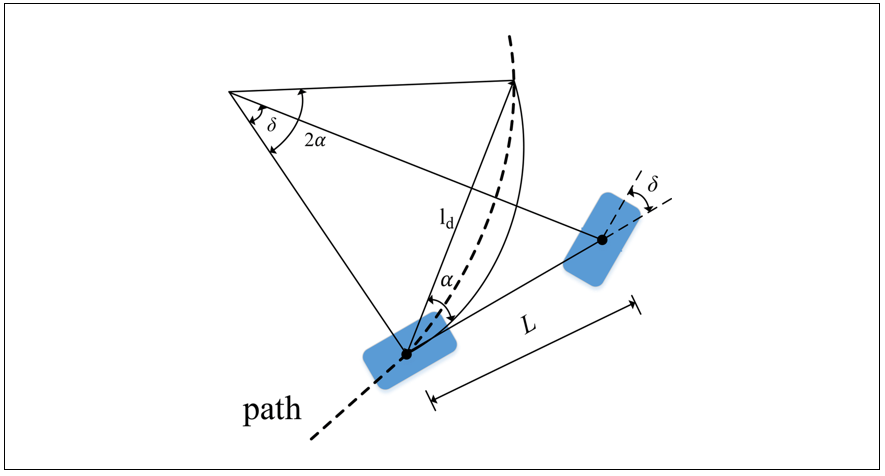
Pure Pursuit is the simplest and most robust path-following algorithm. It picks a point on the path a fixed distance ahead of the car (the lookahead point) as the target and computes the steering angle that drives an arc toward it.
If the vehicle (kinematic bicycle model) follows an arc tangent to its heading that passes through the target point, the steering angle is determined by the angle to the target in the vehicle frame $\eta$ and the distance to the target $L_1$. With wheelbase $L$:
\[\delta = \arctan\!\left( \frac{2\,L\,\sin\eta}{L_1} \right)\]In code:
1
2
3
4
5
6
7
# eta from the vector toward the L1 point at the future position and the heading (yaw)
L1_vector = L1_point - future_position
eta = np.arcsin(np.dot([-np.sin(yaw), np.cos(yaw)], L1_vector)
                / np.linalg.norm(L1_vector))

# Pure Pursuit steering angle
steering_angle = np.arctan(2 * self.wheelbase * np.sin(eta) / L1_distance)
That is all there is to Pure Pursuit steering. A far target (large $L_1$) steers gently; a near one steers sharply. It is robust and computationally light — but how to choose the target distance ($L_1$) remains the problem.
A short $L_1$ tracks well at low speed and tight corners but oscillates at high speed; a long one is stable at high speed but cuts across corners (corner cutting) at low speed and tight turns.
2. Advanced Pure Pursuit
Pure Pursuit proper is a geometric controller drawing arcs toward the lookahead point, so with a fixed lookahead distance $L_1$ it responds slowly at low speed and oscillates at high speed — one $L_1$ cannot satisfy both. Advanced Pure Pursuit fixes exactly this: it varies $L_1$ with speed and curvature, and fills in what the pure PP geometry misses — heading error and vehicle dynamics — with steering corrections.
With the pure Pure Pursuit steering angle as the skeleton, the following are layered on top.
① Speed/Curvature-Adaptive L1 (curvature)
$L_1$ grows with speed and shrinks in corners (high curvature).
\[L_1 = (m_{l1}\cdot v - \text{curv} \cdot v^2) + q_{l1}, \qquad L_1 \in [t_{clip,min},\ t_{clip,max}]\]m_l1makes the car look further ahead the faster it goes, securing high-speed straight-line stability.curvature_factorshrinks the lengthened $L_1$ back down in corners, preventing corner cutting. (Proportional to speed² → acts strongly in fast corners.)
Why the curvature term is needed: with speed alone, $L_1$ gets long at high speed — and in curved sections a long lookahead puts the target point inside the corner, making the car cut across the path (corner cutting). The curvature term pulls the lookahead back so the car follows the path, and thanks to the speed² coefficient it intervenes strongly only in the risky fast corners, without hurting low-speed behavior.
② Multi-Stage Steering Corrections (accel · ang_vel · speed · lateral error)
Corrections are added to or multiplied onto the steering angle produced by the pure PP geometry, raising stability at high speed and in corners.
- Heading-correction PID: catches the difference between the direction the car should point and where it actually points (heading error) and adds the missing steering (
KP/KI/KD). - Acceleration scaling (accel): increases steering while accelerating and reduces it while braking (
acc/dec_scaler_for_steer). - Speed scaling: softens steering response as speed rises to prevent spins (
start/end_scale_speed,downscale_factor). - Lateral-error scaling: corrects steering and speed according to how far off the line the car is (
lat_err_coeff,speed_factor_*).
③ Speed Commands by State
Advanced Pure Pursuit also receives the /behavior_strategy topic from the state_machine and switches between the modes below by situation.
- Default (tracking): follows the raceline speed, slowing in proportion to lateral/heading error.
- TRAILING (following the car ahead): with an opponent ahead, matches speed with a PID (
trailing_p/i/d_gain) to hold the target gap (trailing_gap). If the opponent is not visible, creeps atblind_trailing_speed. - START (launch boost): briefly accelerates at
start_speedon launch. - AEB (emergency stop): stops if the local waypoint to follow is abnormally far (
AEB_thres).
3. Tuning Advanced Pure Pursuit with RQT (Dynamic Reconfigure)
3-1. Starting the Simulator and RQT
The L1 controller runs through the integrated launch, not standalone. Enter the unicorn environment and start the simulator and RQT in separate terminals.
1
2
3
4
# terminal 1 — simulator (L1 PP is the default controller)
unicorn
ros2 launch stack_master race.launch.xml sim:=true map:=f
# map:=map name, sim:=true for simulation
1
2
3
# terminal 2 — rqt (must be the same unicorn environment)
unicorn
rqt
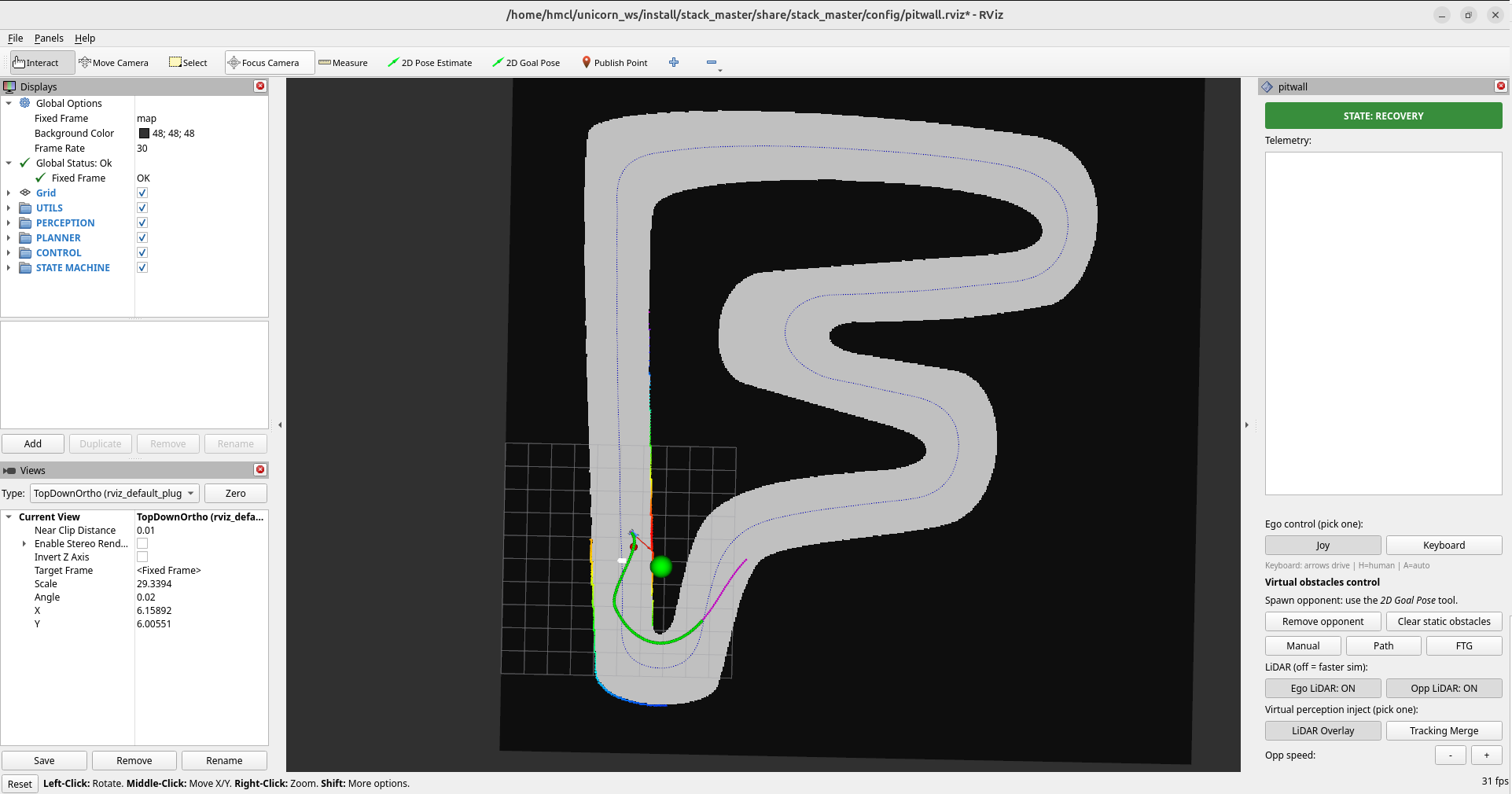
The simulator:
RQT:
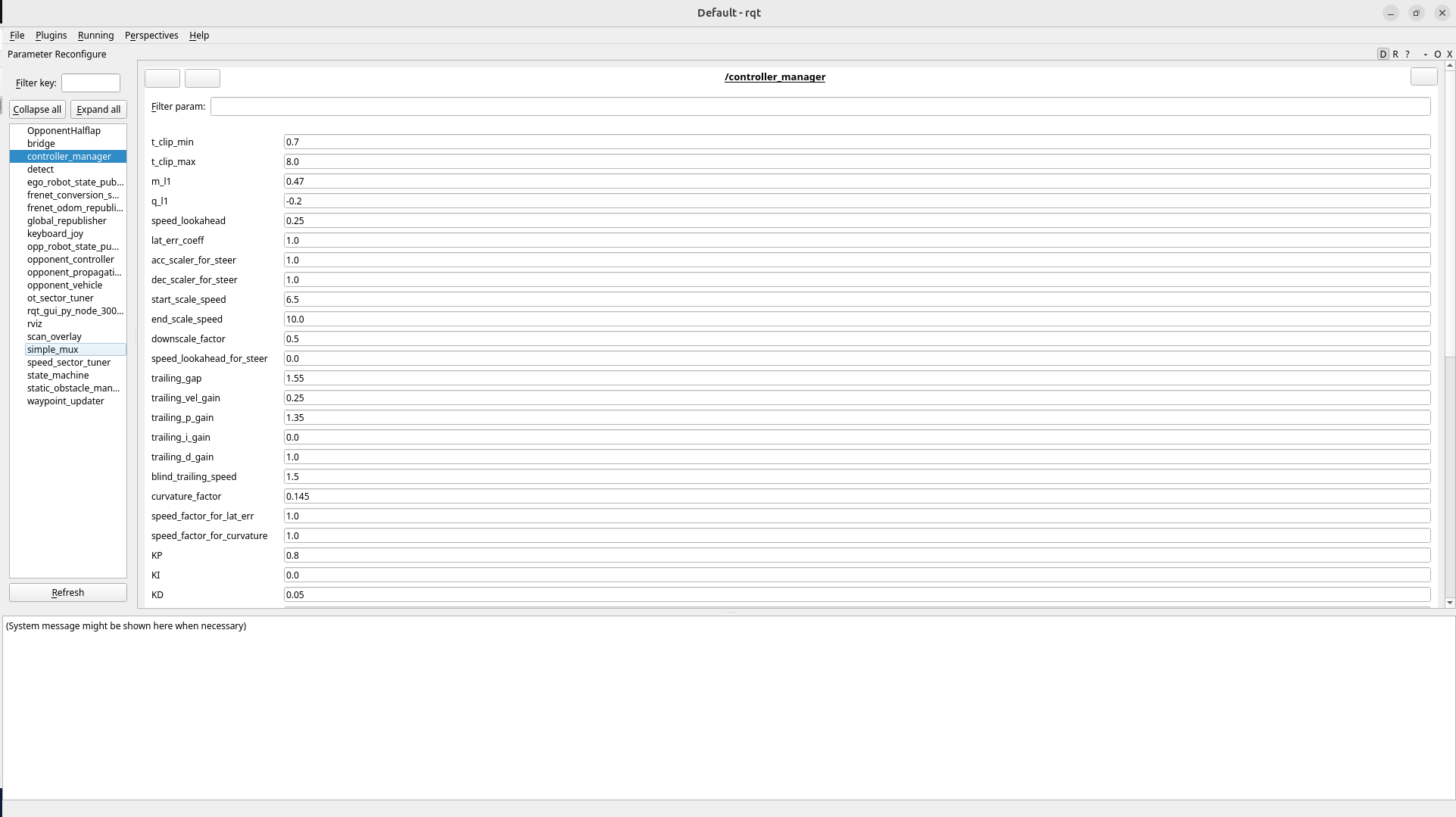
Caution: launching RQT outside the
unicornenvironment (or from an unsourced terminal) gives it different DDS settings, so only some — or none — of the nodes may appear. Always start rqt in the same environment as the simulator.
If you started RQT in the right environment but nothing shows, click Plugins → Configuration → Dynamic Reconfigure in the top menu.
3-2. controller_manager Parameters
controller_manager computes the steering angle and speed from the racing line at every moment. The car’s driving quality — cornering, jitter, pace — is decided almost entirely in this node.
🟢 Tune Actively
One at a time, 10–20% per step.
| Parameter | Default | Meaning | Adjustment by symptom |
|---|---|---|---|
m_l1 | 0.47 | Lookahead slope proportional to speed. The first knob to touch | Side-to-side jitter/oversteer → raise · cutting corners and running wide → lower |
curvature_factor | 0.145 | Reins in corner entry from fast straights (∝ speed², fast corners only) | Pushed wide on corner entry (understeer) → raise |
KP | 0.8 | Adds steering proportional to heading error | Raise until the car stops taking corners wide, short of oscillation. Too high → very unstable |
KD | 0.05 | Smooths KP’s large steering inputs, damping big oscillations | Set to 5–10% of KP. Too high → fine vibration hurts driving |
t_clip_min | 0.7 | Lookahead lower bound. Stabilizes slow/tight sections | Increase if oscillating at low speed |
🟡 Adjust Lightly as Needed
| Parameter | Default | Direction |
|---|---|---|
t_clip_max | 8.0 | Lookahead upper bound. Rarely hit |
lat_err_coeff | 1.0 | How strongly speed is cut off-line/in corners (0 = none ~ 1 = max) |
start_scale_speed / end_scale_speed | 6.5 / 10.0 | Speed where steering sensitivity starts shrinking / where it bottoms out |
downscale_factor | 0.5 | How far steering can shrink at high speed |
steer_gain_for_speed / acc_scaler_for_steer / dec_scaler_for_steer | 1.0 / 1.0 / 1.0 | High-speed steering gain cap / more steering while accelerating / less while braking (hardware-dependent) |
speed_lookahead | 0.25 | Adjust to the motor’s accel/decel characteristics (hardware-dependent) |
🔵 Ignore for Solo Driving (opponent/start only)
| Group | Parameters | Active only when |
|---|---|---|
| Trailing | trailing_gap, trailing_vel_gain, trailing_p/i/d_gain, blind_trailing_speed | In the TRAILING state, following a car ahead |
| Launch boost | start_speed, start_curvature_factor, speed_diff_thres | In the accelerating START state |
3-3. Tuning Practice — L1
Tune while watching how $L_1$ and the heading change via the /lookahead_point topic, shown as a red sphere marker in RViz.
Normal:
The L1 Formula
\[L_1 = m_{l1}\,v \;-\; c_\kappa\,\bar\kappa\,v^2 \;+\; q_{l1}, \quad \mathrm{clip}\big[\max(t_{min},\,\sqrt{2}\,e_{lat}),\ t_{max}\big]\]| Parameter | Default | Role |
|---|---|---|
m_l1 | 0.47 | Speed → $L_1$ slope (higher = looks further when fast) |
curvature_factor | 0.145 | How much $L_1$ shortens in corners |
KP/KD | 0.8/0.05 | Heading control |
Tuning Scenarios
A. Oscillation on fast straights (m_l1 = 0.001)
👀 $L_1$ sits too close to the car, and the car oscillates side to side on fast straights.
Fix: raise m_l1 bit by bit so $L_1$ sits further out at high speed and the steering softens.
B. Corner cutting at low speed (m_l1 = 1.0)
👀 $L_1$ is so long the point lands beyond the corner — the car dives inside the corner and hits the wall.
Fix: lower m_l1 or raise curvature_factor so $L_1$ shortens in corner sections and the lookahead point stops crossing the corner.
C. Oscillation entering corners at high speed (curvature_factor = 0.9)
⚠️ With curvature_factor too high, $L_1$ shrinks excessively and the car can oscillate side to side in fast corners.
D. Heading change from the PID (KD = 0.4)
3-4. The Goal
The UNICORN Racing Team’s tuning aims for a controller that follows whatever path any planner hands it, with little overshoot and slip within intent. The race stack has multiple planners — raceline, avoidance paths, overtaking paths — handing paths of different character to the controller, and a controller fitted to one specific path wobbles or slides whenever the planner changes. This is why Advanced Pure Pursuit adapts its lookahead and steering to speed, curvature, and attitude — faithfully following any path from any planner, without overshoot or slip, is the precondition for using diverse planners freely.
4. Precision Tuning with the Lap Analyser
Tuning by eye with rqt alone leaves you relying on feel. Using lap_analyser to check in numbers whether a setting is actually faster, how far the car strayed from the line, and how close it came to the walls makes tuning far more precise.
What It Measures
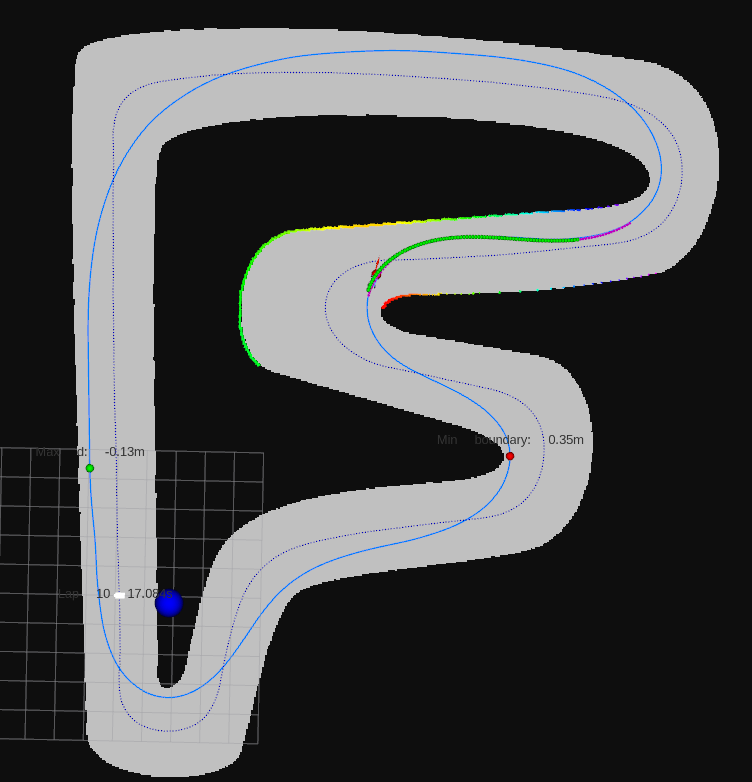
Every lap, it computes:
- Lap time — time for one lap
- Average lateral error — how far off the raceline on average
- Max lateral error — the largest deviation in the lap
- Min distance to boundary — the closest approach to a wall (collision risk)
Every NUM_LAPS_ANALYSED laps (default 10) it prints the mean and standard deviation of these to the terminal and saves them to lap_analyser/data/lap_analyzer_<datetime>.txt.
A small standard deviation means the car drives consistently every lap = a stable setting. A low mean lap time with a large standard deviation is still an unstable situation.
How to Run
In sim, /car_state/odom_frenet and /global_waypoints are already published by race.launch.xml, so it works with no extra setup. Lap results are printed as (warn) logs in the launching terminal.

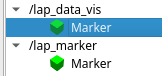
In RViz, adding the lap_marker (actual driven trajectory) and lap_data_vis markers published by lap_analyser lets you see the line the car actually drew.
Using It for Tuning
The goal is a setting that lowers lap time while keeping max lateral error and boundary distance out of danger.
- Change one value in rqt → drive a few laps → compare the lap time / lateral error / boundary distance numbers in the log → adjust again. Repeat this loop.
- e.g. raising
m_l1cut the lap time but the boundary distance in corners shrank sharply → too aggressive; back off a little. - e.g. lap-time standard deviation is large (inconsistent laps) → still unstable; readjust the stability parameters (
t_clip_min,downscale_factor, …).
Wrap-up
This post covered the geometry of Pure Pursuit, the Advanced Pure Pursuit that adapts $L_1$ to speed and curvature with multi-stage steering corrections, and both live RQT tuning and precision tuning with the Lap Analyser. The core sequence: m_l1 → curvature_factor → KP/KD, one at a time, adjusting by symptom as in the scenario videos. For the theoretical background of the extension modules, also see Pure Pursuit-based Steering and Speed Control.