VESC General Tab (Motor Settings) Guide
VESC General Tab (Motor Settings) Guide
This post summarizes key precautions and settings in the Motor Settings tab.
Saving Motor Settings
If you change any Motor Settings, you must click Write Motor Configuration in the right menu to save them.
Motor direction
- We recommend using Invert Motor Direction under General → General.
- You can also swap the motor phase wires, but FOC detection must be repeated each time.
- Another option is to flip the command sign in the VESC ROS package before it reaches the motor.
Motor current settings
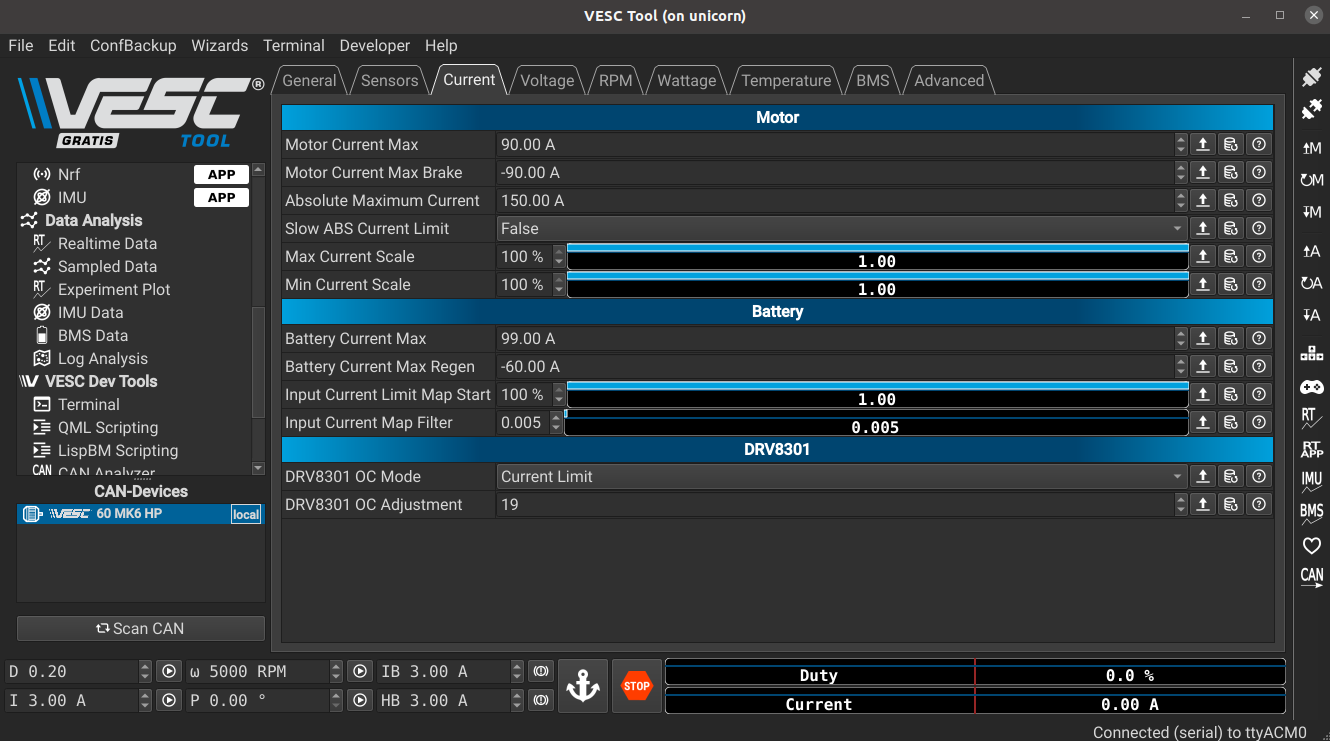
- You can change motor current limits in General → Current. Make sure you understand the VESC and motor specs first.
- Monitor real-time current in the
vesc/sensors/coreROS topic. If speed no longer increases under higher speed commands or current is capped, you can raise the max current to improve top speed or braking. - With sensorless motors, rotor position is hard to estimate at low speed. The controller uses higher current to start the rotor, then switches to FOC control once speed is sufficient.
- If the max current is too high, the VESC must handle very large startup currents. This can burn current-limiting drivers (e.g., DRV8301), and repeated high current can cause a weird and loud sound, leading to failed starts.
- If the max current is too low, a heavy vehicle may struggle to start and also produce a weird and loud sound.
Caution
Additional Voltage, RPM, and Advanced settings might improve performance, but changing them without expertise can be dangerous. Do not adjust them unless you fully understand the impact.
Wrap-up
Set current limits only after you fully understand the VESC and motor specs. Incorrect settings can damage hardware, so proceed carefully.
This post is licensed under CC BY 4.0 by the author.