VESC PID Controllers Tuning Guide
Once FOC setup is complete, the next step is improving control precision. VESC Tool provides PID tuning tools for precise current control, allowing you to shape motor response as needed. This post summarizes how to tune PID gains and what to watch out for.
When PID tuning is needed
If you use a sensorless motor, PID tuning is strongly recommended. With sensored motors, the difference may be smaller.
Tuning setup
- Use the interface below to tune PID gains.
- Observe changes in Data Analysis → Realtime Data → RPM on the left panel.
- Enable Stream realtime data in the right menu to view changes live.
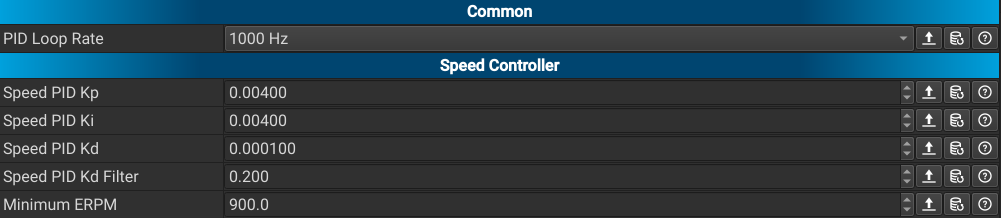
How to run the motor
Use the play button next to RPM at the bottom to run the motor, and use STOP on the right to stop it.

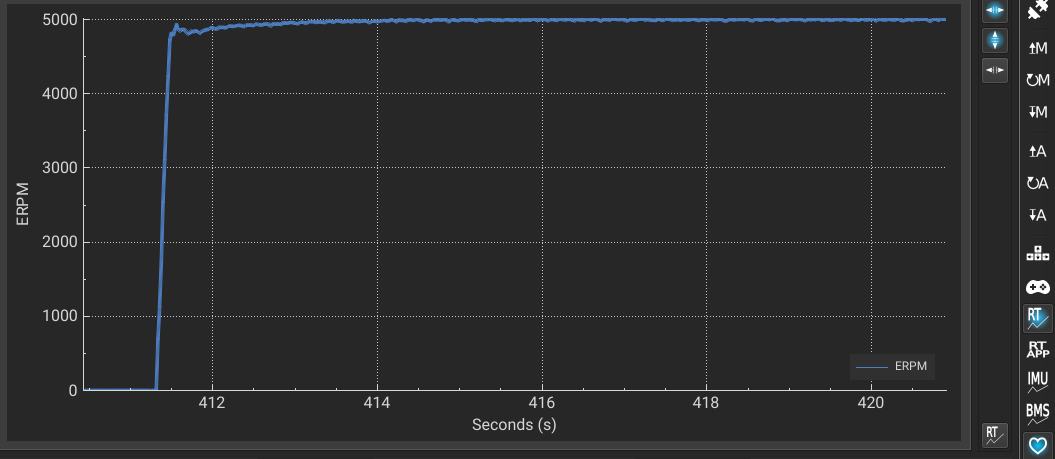
How to tune PID gains
We recommend focusing on P and D during tuning.
- Increase P gradually and observe response speed and overshoot across various RPM ranges. Keep it at a level where overshoot is not excessive.
- Increase D gradually to reduce large oscillations.
- If D is too high, the system can become sensitive even to small vibrations, so raise it in small steps.
Caution
You are working with current settings, so be careful at all times. Avoid making large, sudden changes.
Wrap-up
PID tuning is a critical step that determines motor control quality. With good tuning, the vehicle responds quickly and stably. With poor tuning, responses become sluggish or vibrations appear. We recommend spending time testing across different RPM ranges to find optimal gains.